
Why Do Daily Backtest Results Differ Across Time Zones?
Two reports can agree on every trade and total profit while disagreeing on the worst day. Before assuming one report is wrong, compare how each defines a day. A prop firm backtest timezone mismatch can split one session into two dates or combine results that the firm assigns to different sessions.
That affects daily profit, qualifying-day counts and calculations based on a day’s opening balance. It can also change strategy entries if the code uses time-based conditions. These are different problems, and fixing the displayed clock does not necessarily fix either one.
Start by separating three clocks: the timestamps in the data, the session used by the strategy and the boundary used by the firm’s rules.
A displayed clock is not a session definition
A chart timezone tells you how a time is displayed. A strategy’s session condition determines when its logic is eligible to act. The firm’s reset policy determines which rule day receives a result or establishes a new reference balance. Those settings may align, but they are not interchangeable.
TradingView’s Pine time documentation distinguishes chart and exchange timezones. It explains that Pine scripts do not obtain the chart’s timezone setting, and that timezone parameters affect time interpretation and calendar calculations. This is why changing the visible chart clock is not enough evidence that a script’s session logic changed.
Record the timezone beside every timestamp source. A value such as “09:30” is incomplete without a date and zone. Likewise, “daily reset” is incomplete without the cutoff and the timezone in which that cutoff is defined.
| Clock | Question to answer |
|---|---|
| Source timestamp | Is the exported value UTC, a named zone or a local time without an offset? |
| Strategy session | Which clock determines when entries and exits are allowed? |
| Rule session | At what instant does the firm start its next accounting day? |
The same $40 profit can belong to one day or two
Consider two constructed closed trades on 12 October 2026: a $120 net gain at 21:50 UTC and an $80 net loss at 22:10 UTC. On that date, those timestamps are 17:50 and 18:10 in New York. Both belong to 12 October when grouped by New York calendar date.
In Prague, they are 23:50 on 12 October and 00:10 on 13 October. Grouped by Prague calendar date, the gain and loss belong to separate days. The combined profit remains $40.
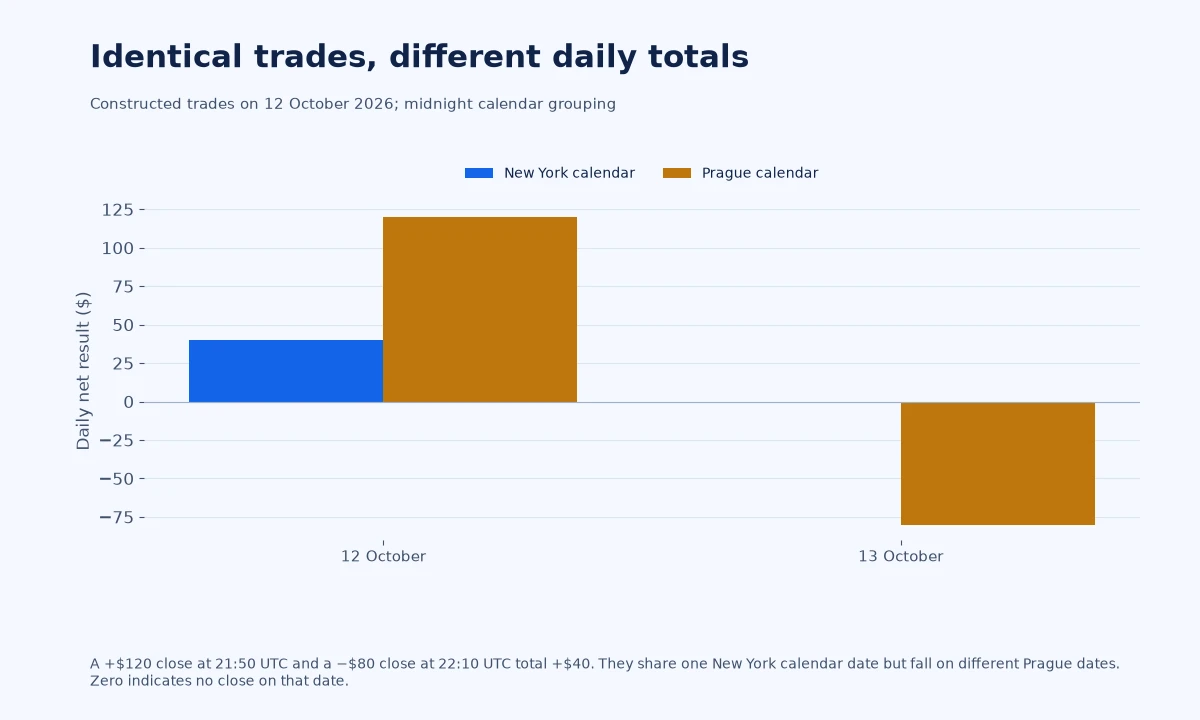
The New York calendar grouping shows one active date with +$40. The Prague calendar grouping shows two active dates, one at +$120 and one at −$80. That can change a count or best-day calculation even though no trade changed.
This example compares midnight calendar boundaries only. It does not model a firm with a non-midnight session cutoff. It also does not evaluate daily drawdown, because two closed-trade results do not reveal equity during the positions.
That last distinction matters. A loss-limit calculation may depend on a reference balance at the reset, open P&L and fees. Regrouping net results is a useful audit step; it is not a complete equity reconstruction.
Build the rule clock from the actual policy
Read the exact product’s definition before selecting a timezone in a report. As a scoped example, FTMO’s CFD trading objectives define daily loss calculations with a midnight CE(S)T reset. That should not be copied into a futures account whose session uses a different cutoff.
For a non-midnight reset, create a session identifier from the cutoff rather than the calendar date alone. A trade after an evening cutoff may belong to the next trading session under the firm’s convention. Label the session consistently and document whether its name refers to the opening or closing date.
Use named timezones that account for daylight saving where the rule is expressed in local civil time. TradingView’s documentation describes IANA timezone identifiers and their offset adjustments. A permanently fixed UTC offset can drift from a local session after a seasonal clock change.
Check transition weeks deliberately. Different regions can change clocks on different dates. A setup that appears correct in one week is not proof that a hard-coded conversion stays correct across the whole backtest.
Reconcile a small sample before processing everything
Pick a trade clearly inside the session, one just before the reset and one just after it. Keep the original timestamp, converted timestamp and assigned session in separate columns. Include entry and exit times so you can test opening-based and closing-based requirements independently.
Then select an overnight position and a date near a clock change. Compare the conversion with the platform’s visible record. If the source export does not specify its timezone, resolve that ambiguity before building daily totals.
Save the original file unchanged. Write conversions into a new file and record the method used. That makes it possible to diagnose an error without wondering whether the original times were overwritten.
Tradelyze’s custom rules documentation distinguishes chart-time interpretation from exchange-time grouping. Its daily grouping is based on closed trades. Confirm those settings against your source data and account policy rather than treating the default as an exact firm match.
Changing the clock can change the strategy, too
There are two separate comparisons to run. First, hold the trades fixed and change only the reporting boundary. That isolates the effect on daily statistics. Second, if the strategy’s intended session was configured incorrectly, correct the code or input and rerun it. That can create a different set of trades.
Do not describe the second result as a simple formatting correction. A time filter may remove entries, change an opening range or cause an earlier exit. Preserve both versions and explain the intended session in words before interpreting the performance difference.
The strategy validation guide is useful when reproducing the revised logic. Keep unused data separate from the period you used to discover and correct the issue.
Finally, review the daily loss calculation using the firm’s equity basis. If only closed trades are available, label open-equity behaviour unknown. A correct timezone cannot supply price or position information missing from the dataset.
Your timezone audit record
A reusable record needs the original data source, export setting, named timezone, rule cutoff, strategy session, daylight-saving treatment and a few manually checked examples. Include the date of the policy review; a correct conversion can become irrelevant if the account terms change.
Once the clocks are reconciled, compare daily totals and day counts again. If a discrepancy remains, investigate commissions, partial exits and the firm’s assignment rules next. Do not keep changing offsets until the totals happen to match.
Common questions
Will changing the TradingView chart timezone change my Pine strategy?
Do not assume so. The chart’s display setting and Pine’s time calculations are distinct. Inspect the script’s timezone and session logic, then verify the actual entries and exits after any intended change.
Should every prop firm backtest use New York time?
No. Use the timezone needed to interpret the source data and the exact session boundary required by the account. A familiar exchange clock is not automatically the firm’s accounting clock.
Can the total profit stay the same while a daily rule changes?
Yes. Reassigning identical trades to different days preserves their combined net result but can change daily totals and counts. The numerical example above illustrates that distinction without claiming a complete rule check.